From Contact Form to Order Portal in Four Days: Building a 3D Printing Business’s Customer Portal on Netlify
The website could give you a ballpark price in three questions. The moment you pressed Send, it turned into an email to Tim, and everything after that lived in inboxes and memory.
TL;DR
G3DK Printing is a one-person 3D printing business in Sydney. Tim prints things from models customers send in. The website was friendly up to the point you asked for a quote; after that it was just an email, and the quoting, the back-and-forth, the photos, the invoice, the postage and the tracking number all happened by hand.
Now every enquiry becomes an order with its own page. Customers sign in with a link emailed to them, with no password to forget. They can chat with Tim on the page or just reply to the emails, accept a quote with a tick-box, see photos of their finished print, pay an invoice that already includes the postage, and get a tracking link when it ships.
It took four days to build, and it went live on 27 September 2026. The first real order went all the way through on launch day. It’s still labelled beta.
If you’re here for the technical details, they’re at the bottom.
At a glance
- Stack: still a static site, now with Netlify Functions, Netlify Database (Postgres) and Netlify Blobs, plus Postmark for email, Square for payments and the Australia Post postage API. No framework, no extra host, no passwords.
- Time: four days, 24–27 September 2026, in eight milestones. Each was a pull request, tested on a deploy preview, then merged. Built pair-programming with Claude Code.
- By the numbers: about 4,800 lines of portal code, 1,900 lines of tests (91 tests against a real in-process Postgres), 23 serverless functions, 7 database migrations.
- Status: live in production, in beta. First end-to-end order on launch day: enquiry, quote, chat by email, photos, live postage, card payment, shipped, arrived.
Everything after the email
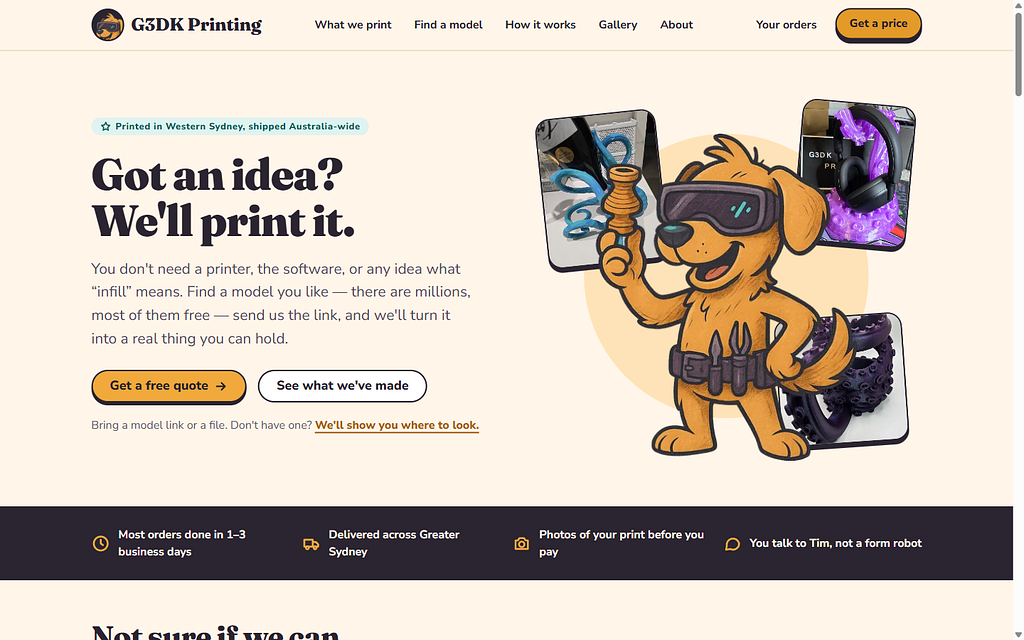
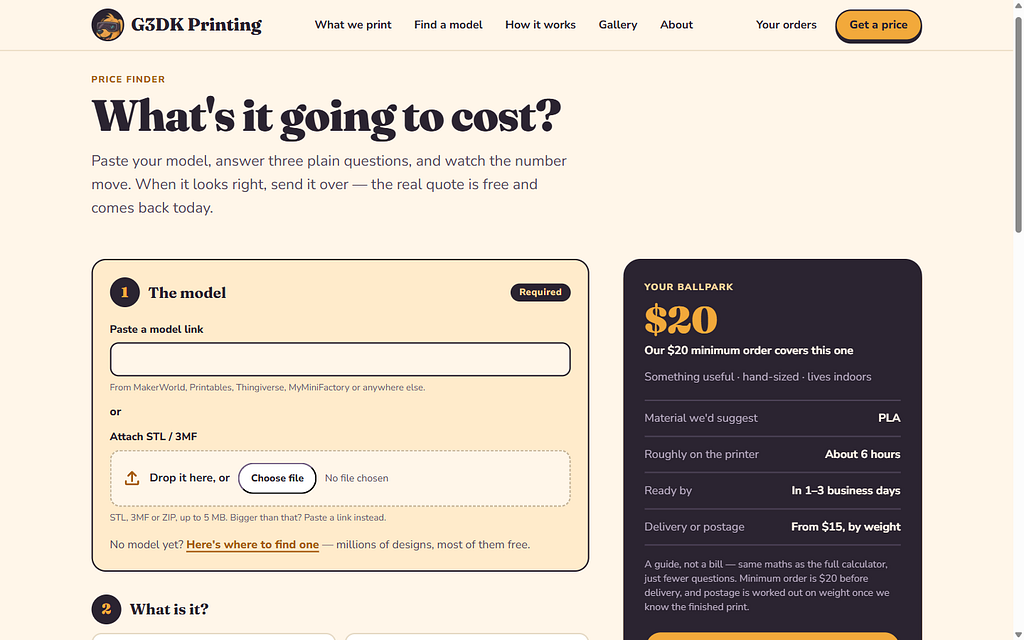
G3DK Printing is a one-person workshop: two Bambu Lab P1S printers and a 16K resin printer. The website already did the front half of the job rather well. It had a price finder, where three plain-English questions get you a ballpark; an advanced calculator for people who want the dials; and a quote form, handled by Netlify Forms, that emailed Tim. It even had an AI agent endpoint, an A2A agent card, so another AI could get a quote and submit a request without a human in sight.
What it didn’t have was anything after the email. A customer who’d sent a model got a reply from a person, then another, then a price, then photos, then some way to pay, then a parcel. Every step of that was Tim remembering to do the next thing, in whichever inbox the last message had landed in.
I built it pair-programming with Claude Code, on a simple split: I supply direction, the agent supplies execution.
Eight requirements and a handful of rules
The brief for phase 2 was eight requirements:
- Run the order portal and back end on Netlify, integrated with Square.
- After an enquiry, customers log in with their email and a magic link that expires in a few hours.
- Each order has chat, and it works by email too.
- Quote generated, quote accepted by the customer.
- Printing, with photos uploaded.
- Invoice through Square, including postage.
- Ship once it’s paid.
- Optionally, Australia Post labels and pickups.
And a few business rules that shaped everything: a $20 minimum, delivery from $15, no GST (the business isn’t registered), photos go out before payment, payment comes before shipping, and G3DK only prints supplied models, with no design work.
Those last two orderings, photos before payment and payment before shipping, turned out to be the spine of the whole build. Most of the interesting code exists to make sure they can’t be skipped.
Keep the static site, add a thin layer beside it
The site stayed static: plain HTML pages and vanilla JavaScript modules, no framework. Beside it went a thin server layer of Netlify Functions, one file per endpoint, with a Postgres database from Netlify, Netlify Blobs for files, and three outside services: Postmark for email, Square for payments and Australia Post for postage prices. No new host, nothing to patch at two in the morning.
Every order moves through one status machine, from enquiry through quoted, printing, invoiced and paid to shipped and completed. The server and both pages, the customer’s and Tim’s, share the same definition, so the wording can’t drift between what the customer reads and what Tim sees.
And everything shipped dark. Every portal function returns a 404 unless one environment variable, PORTAL_ENABLED, is true. Deploy previews had it on, with Square’s sandbox; production had it off until launch day. That one flag is also the rollback.
Four days, eight milestones
The build went in as eight milestones, M0 to M7, each its own pull request, tested on a Netlify deploy preview and then merged:
- M0: foundations.
- M1: enquiries become orders, a “My orders” page, and Tim’s admin list.
- M2: a message thread on each order, the email bridge, and bounce handling.
- M3: quotes.
- M4: printing and photos.
- M5: delivery details, Square invoices and payment.
- M6: shipping.
- M7: go-live: the Privacy and Terms pages, enquiries going to the portal first, and “Your orders” links.
Because the whole thing was dark in production, each milestone could land on main the moment it was ready, with nothing visible to customers. The deploy previews were where it got exercised, against real Postmark and the Square sandbox.
The link that silently didn’t send
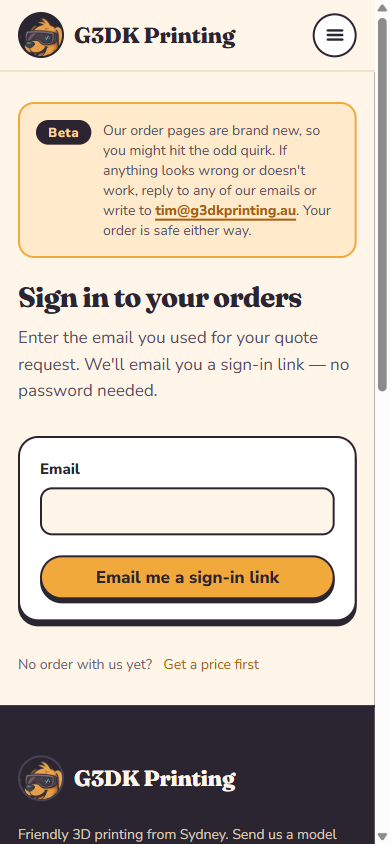
Sign-in is by magic link: no passwords, no accounts to create. To stop anyone using the “email me a link” button as a spam cannon, there’s a limit of five links per address per hour.
Testing found the flaw. The limit was also counting the sign-in links inside our own order emails. A fast-moving order sends a lot of those: quote, printing, printed, invoice. By the time the customer went looking for a fresh link, the order had spent the allowance for them, and their “email me a link” silently sent nothing. No error, no email, just a customer who can’t get in.
The fix was to count only the links a person asks for.
Lesson: A rate limit protects you from the people pressing the button. Make sure it’s counting them, and not your own system doing its job.
What the unit tests couldn’t see
npm test runs 91 tests against a real Postgres, running in-process, with every migration applied. The outside services are faked at the fetch level, so the tests can check the exact request bodies that would go to Square and Postmark. And for the rules that matter most (the webhook signature, customers only ever seeing their own orders, the payment gate, the guard against paying an invoice twice) we deliberately broke the code and confirmed a test failed. A test you’ve never seen fail is a test you’re taking on trust.
Then came the browser runs. Headless Chromium drove whole orders through against a scratch server running the real function modules: the customer at phone width, Tim at desktop width. They caught what no unit test could:
- buttons touching each other,
- a pickup order ending on a “Delivered” badge,
- local drop-off customers being promised “tracking details” they were never going to get.
None of those is a bug in the logic. The status was right, the rules held, every assertion passed. They’re bugs in what a person reads, and you only find those by being the person.
Lesson: Unit tests prove the rules. Only walking an order through as the customer proves the story they’re told.
The unglamorous half
Getting email right took as long as some features.
Postmark sends as orders@g3dkprinting.au, with its own DKIM key and a custom return path, so SPF and DKIM both line up. Replies come back through a separate subdomain, so every order gets its own reply address and the customer can answer from their own inbox. The business mailbox had its own saga: Proton had no free domain slot, so the domain started on ImprovMX forwarding; later an old domain was retired from Proton, g3dkprinting.au moved in, and the old domain was parked on ImprovMX’s free plan. DMARC reports go to Postmark’s free weekly digest. The first Google report showed only Postmark sending, and everything passing.
A few surprises along the way:
- Square’s hosted payment page asked for a US ZIP code, because the sandbox test card is a US card.
- Proton kept “delivering” test emails to its own inbox, because an old linked Gmail address was still attached to the account.
Launch day
Launch was a runbook, not an event. Production environment variables went in, the Postmark inbound webhook moved from the deploy preview to production, PORTAL_ENABLED went to true, and the site redeployed.
Then a real order went all the way through: enquiry, quote, acceptance, a reply by email landing in the chat, printing and photos, live Australia Post prices, a production Square invoice paid by card, shipped, arrived.
The “Payment received” email arrived one second after the card payment.
What it looks like now
- An order page for every enquiry, with the order’s status, its chat, its quote, photos of the print, the invoice and, once it ships, the tracking link.
- Chat that nobody has to use. Every message can be answered by replying to the email.
- Square invoices with postage already in them, priced live from Australia Post, payable by card, or by PayID for customers who’d rather do a bank transfer.
- Rules the server enforces, whatever the page shows: no Printed without a photo, no shipping without payment.
- A “Move back a stage” control for Tim, for when a print fails and needs re-quoting.
- About 4,800 lines of portal code, 1,900 lines of tests, 23 functions and 7 migrations, on the same Netlify site the static pages always lived on.
- Privacy and Terms pages written from what the code actually does, including a promise the code keeps: files are deleted 12 months after an order closes.
- A “Beta” notice, and a fallback: if the portal ever can’t take an enquiry, the quote form still posts to Netlify Forms, so nothing is lost.
The honest part
The features were never the hard part. A quote builder is a form. A chat thread is a table. The four days went into the orderings: making “photos before payment, payment before shipping” true on the server, not just on the page; making sure going backwards can’t become a way around going forwards; checking that Square’s total matches ours to the cent before anything is sent. And they went into email, which is where a small business actually meets its customers, and where most of the surprises were.
What made four days possible wasn’t typing speed. It was that the whole thing was dark until the last day. Each milestone landed small, got exercised on a preview against the real services, and merged, and nothing a customer could see changed until one flag flipped. The rollback was the same flag.
And it’s not finished. It’s in beta. Australia Post labels and pickups, the optional eighth requirement, aren’t built. But the first real customer order went from “here’s my model” to “it’s arrived” without anyone having to remember what came next.
Keep it dark until it’s done. Then flip one flag.
Under the hood: how it’s built
What it runs on
- Netlify Functions: Node ESM, one file per endpoint, 23 in total, rate-limited at the edge.
- Netlify Database (@netlify/database 2.0.1): Postgres, migrations applied on deploy, a database branch per deploy preview.
- Netlify Blobs (@netlify/blobs 11.1.1): model files, photos and chat attachments.
- Postmark: outbound email, plus inbound for reply-by-email, and bounce and spam webhooks. DMARC Digests for the weekly reports.
- Square Invoices API: customers, orders, invoices, and signed webhooks for payment.
- Australia Post Postage Assessment Calculator (PAC): domestic parcel prices.
- PGlite (@electric-sql/pglite 0.2.17): in-process Postgres for the tests.
- The existing site: static HTML with TailwindCSS and vanilla JavaScript modules, plus an A2A agent endpoint.
The shape
Browser pages (static HTML + vanilla JS modules)
   │  fetch /api/…  (same-origin, JSON)
   ▼
Netlify Functions (Node ESM, one file per endpoint, rate-limited at the edge)
   │
   ├── server/*.mjs      business logic (auth, orders, messages, quotes, invoicing, dispatch…)
   ├── lib/*.mjs         shared with the browser: pricing maths, quote maths, order statuses
   │
   ├── Netlify Database  Postgres, migrations applied on deploy, a branch per deploy preview
   ├── Netlify Blobs     model files, photos, chat attachments
   │
   └── Postmark · Square · Australia Post PAC
The status machine, shared by the server and both pages:
enquiry → quoting → quoted → accepted → printing → printed → invoiced → paid → shipped → completed
                                        (plus declined · expired · cancelled)
Decisions
- Keep the static site; add functions beside it. No framework, no extra host.
- Ship dark behind one flag. PORTAL_ENABLED gates every portal function (404 otherwise), and it’s also the rollback.
- No passwords. Magic links only, stored as SHA-256 hashes.
- Staff emails never contain sign-in links. An admin link sitting in an inbox would open every customer’s details.
- The server re-prices every quote. Totals from the browser are never trusted.
- Square doesn’t email the invoice (SHARE_MANUALLY). Our email carries the photos and the pay link, so the customer gets one clear message, not two.
- “Move back a stage” only goes backwards, so the forward rules can’t be bypassed.
- A fallback for enquiries. If the portal can’t take one, the form still posts to Netlify Forms.
Sign-in without passwords
Customers never create an account. The quote form creates a customer and an order, and the confirmation email carries a one-time sign-in link.
- Tokens are stored as SHA-256 hashes only. A database leak gives nobody a working link or session.
- The token travels in the URL fragment (/portal-verify.html#t=…), which browsers never send to servers or put in Referer headers. The verify page also needs a click before it uses the token, so email link scanners that “pre-open” links don’t burn it.
- Links expire after 3 hours and work once. Customer sessions last 30 days and slide with use. Tim’s admin sessions last 12 hours.
- Every POST goes through one wrapper that checks the feature flag, the method, a same-origin Origin header and a JSON body.
- Only links a person asks for count towards the 5-per-address-per-hour limit (see the story above).
Chat that works by email
- Each order gets its own reply address, g3dk-1001.<16 hex chars>@reply.g3dkprinting.au. The hex is an HMAC of the order number, so addresses can’t be guessed or forged.
- reply.g3dkprinting.au has an MX record pointing at Postmark inbound, which posts every message to a webhook (basic auth in the URL). The function checks the signature, works out who sent it (the customer, or Tim from any of Tim’s known addresses), strips the quoted history, and adds it to the thread with any attachments.
- The other side is emailed unless they’re looking at the order right now: a presence table records open pages, and a five-minute sweep catches the rest. Postmark bounce and spam webhooks mark a customer’s address as failing and warn Tim.
- Pages poll every 10 seconds. System lines in the chat (“Quote accepted”, “Payment received: $35.00”) double as the signal for the other side’s page to refresh itself.
Quotes
The admin quote builder suggests a price from the slicer weight (grams × material rate × 1.2) and allows extras and discounts. The server re-prices every quote. Quotes are versioned (a revision supersedes the last), expire after 14 days (a daily job), top up to the $20 minimum as a separate line, and are accepted with a tick-box. The time and IP of acceptance are recorded, and the tick-box links to the Terms.
Photos you can trust
Tim uploads photos from a phone. The admin page shrinks them to 2000 px JPEG in the browser and uploads them one at a time. The server then sniffs the magic bytes: only real JPEG, PNG or WebP files are stored as photos. When one is shown inline, it’s served as that exact type with X-Content-Type-Options: nosniff and a CSP sandbox. Anything else is only ever a download. An “image” that’s really HTML can’t run on our domain.
Square invoices, with postage included
- Postage: the packed parcel’s weight and size go to the Australia Post PAC API from the workshop’s postcode. Prices come back cheapest first, with the $15 delivery floor applied.
- The invoice: find or create the Square customer, build a Square order (each quoted line, discounts as fixed-amount discounts, the minimum top-up and a delivery line), then check Square’s total against ours. If they differ by a cent, nothing is sent. Then create and publish the invoice: card only, due in 7 days.
- SHARE_MANUALLY: Square doesn’t email the invoice; our email does.
- Payment: Square webhooks are signed with HMAC-SHA256 over the notification URL plus the body, and deduplicated by event ID. invoice.payment_made moves the order to Paid, emails the customer, and tells Tim it’s ready to ship.
- PayID: customers can pay by bank transfer instead. “Mark paid (PayID)” first checks Square hasn’t already been paid by card, then cancels the Square invoice so it can’t be paid twice.
- Reminders go out 3 days after sending and on the due date.
The webhook check, copied from the deployed source. Note the URL is part of what’s signed, so it must be exactly the one registered with Square:
/**
 * Square signs each webhook with HMAC-SHA256(signature key, notification URL + raw body), base64.
 * The URL must be exactly the one registered in the Square Developer Dashboard.
 */
export function validWebhookSignature({ signature, url, body }) {
  const key = env("SQUARE_WEBHOOK_SIGNATURE_KEY");
  if (!key || !signature) return false;
  const expected = Buffer.from(createHmac("sha256", key).update(url + body).digest("base64"));
  const given = Buffer.from(signature);
  return expected.length === given.length && timingSafeEqual(expected, given);
}
Shipping, and the rules that can’t be skipped
“Ship it” is enforced on the server: an order that isn’t paid can’t be shipped, whatever the page shows. Tim enters the tracking number (dashes and spaces from a pasted label are fine), the customer gets an email with an Australia Post tracking link, and the order completes when the customer taps “It’s arrived”, or 14 days after shipping (daily job). Pickup and local drop-off skip tracking and go straight from Paid to Collected or Delivered.
“Move back a stage” never goes back past payment, needs a reason, and can optionally email the customer. It also tidies up: an unpaid invoice is withdrawn in Square, the old quote is set aside, and tracking details are cleared.
Testing: a real database, fake everything else
- 91 tests against PGlite with every migration applied, so the SQL is exactly what production runs.
- Postmark, Square and Australia Post are replaced by a fake fetch that behaves like the real APIs, so tests check the exact request bodies (for example that an invoice goes out card-only and SHARE_MANUALLY).
- Mutation checks on the security-critical rules: webhook signature, customers only seeing their own orders, the payment gate, the paid-invoice guard.
- Headless Chromium runs against a scratch server running the real function modules, customer at phone width and Tim at desktop width.
- Deploy previews: every milestone tested by hand against real Postmark and the Square sandbox.
Gotchas
- Rate-limit only what people ask for. Counting system-sent sign-in links let a busy order lock its own customer out, silently.
- Put the token in the fragment and make the verify page need a click, or link scanners will spend it.
- Square’s webhook signature covers the URL. If the URL you check against differs from the registered one, every webhook fails.
- Square’s sandbox test card is a US card, so its payment page asks for a US ZIP code.
- Check what customers read, not just what the code does. A pickup order ended on “Delivered”; local drop-off promised tracking.
Launch runbook
- Production env vars: staff emails, a new reply-signing secret, the Square production webhook key.
- The Postmark inbound webhook moved from the deploy preview to production.
- PORTAL_ENABLED=true and a redeploy.
- A smoke test with a real order: enquiry → quote → acceptance → a reply by email into the chat → printing and photos → live Australia Post prices → a production Square invoice paid by card → shipped → arrived.
What’s next
- Australia Post labels and pickups from the admin page, via an aggregator like Starshipit or Shippit, once there are enough parcels that copying tracking numbers gets tedious.
- Dropping the Beta label.
- Tightening DMARC to p=quarantine after a few clean weekly digests.
G3DK Printing: g3dkprinting.au. Send a model link, get a price, follow your print all the way to your door.