Crossfadarr — How Dropping Spotify Turned Into a Two-Day Software Project
Or: what happens when a homelabber decides his music taste shouldn’t live in someone else’s cloud
It started, like a lot of these things do, with a car.
When Tesla added native YouTube Music support, I did the math and cancelled Spotify. I was already paying for the frankly-not-cheap YouTube family plan, and that plan includes YouTube Music. Keeping a separate Spotify subscription on top of it was paying twice for the same thing. So: one fewer subscription, no change to how I actually listen. Easy win.
Except it wasn’t quite that clean.
YouTube Music’s discovery is genuinely decent — the radios and “because you liked” mixes surface stuff I’d never have found. But everything it learns about me stays in YouTube Music. My liked songs, the artists I’ve saved, the channels I subscribe to: all of it lives behind Google’s login, useful only inside Google’s app. And I’m a homelabber. My whole hobby, lately, has been the slow, satisfying project of pulling my digital life out of other people’s clouds and onto hardware I own. Photos, notes, home automation, monitoring — one by one, off the rent-forever platforms and onto the rack in my office.
My music taste was still a hostage.
The gap
I already run Lidarr — the music member of the arr family, the self-hosted apps that manage your media library. Lidarr is great at organising and monitoring artists you tell it about. It is not great at knowing what you like, because it has no idea what you’ve been thumbs-upping on some streaming service all year.
So the shape of what I wanted was obvious: take the three signals YouTube Music already has about me — the artists whose music I’ve saved, the channels I subscribe to, and the artists behind my liked songs — and turn them into a clean list I could review and hand to Lidarr. A bridge. Read from one side, review, write to the other.
I went looking for that bridge. It doesn’t really exist. There’s an old Lidarr pull request that only handles public playlists. There’s a community plugin that won’t build against the one library that can actually read a private YouTube Music account. And that library — ytmusicapi — is unofficial, because Google offers no official API for reading your own YouTube Music library. That’s the crux of the whole problem: the data is yours, but the only door to it is a side door.
Fine. I’d build the bridge myself. I gave myself a weekend.
Building it with an agent, not by hand
I didn’t write most of this by hand. I built it in a tight loop with an AI coding agent (Anthropic’s Claude, running in my terminal), the same way I’ve built the last few homelab projects — I describe the outcome and the constraints, it writes and runs the code, I steer, we verify against the real thing. Every commit in the repo carries co-author attribution to make that honest and visible.
The point I want to make here isn’t “AI wrote my app.” It’s that the agent let me spend two evenings on the interesting problems — the matching, the auth, the judgment calls — instead of two weekends on boilerplate. The project went from empty folder to a public v1.0, dockerised and published, inside about two days. Here’s what actually turned out to be hard.
Hard problem #1: the front door is held shut with tape
ytmusicapi authenticates by borrowing your browser’s session — you copy the request headers out of a logged-in YouTube Music tab and hand them over. It works. It is also fragile in a specific, maddening way: Google rotates the cookies of any session that stays active, so if you grab headers from your everyday browser, that same browser keeps using the session, rotates the cookie out from under you, and your saved credentials can die within hours.
The fix is almost silly, and it took real testing to land on: do it in an incognito window. Log in, copy the headers, then close the window without logging out. A closed private session never rotates its cookies again, so the snapshot you took stays valid for weeks instead of hours. Crossfadarr walks you through exactly that, and validates the paste against a live call to your library before it stores anything, so you find out immediately if it worked.
I also went down the “proper” road — I built the full OAuth device-code flow, the durable, grown-up way to authenticate. It works perfectly, right up until you use the token: YouTube Music’s internal API currently rejects valid OAuth tokens outright, HTTP 400 on every endpoint, even though the exact same token is happily accepted by Google’s official YouTube Data API. It’s a known, Google-side limitation that hits every tool built on this library. So the OAuth code is still in the app, built and working and marked “unavailable,” waiting for Google to flip a switch it may never flip. Sometimes the honest engineering outcome is a feature that sits there labelled doesn’t work yet, not our fault.
Hard problem #2: is “澤野弘之” the same artist as “Hiroyuki Sawano”?
To hand an artist to Lidarr, you need their MusicBrainz ID — MusicBrainz being the open, crowd-sourced encyclopedia of music that the entire arr ecosystem uses as its source of truth. So Crossfadarr searches MusicBrainz for every artist it pulls out of YouTube Music.
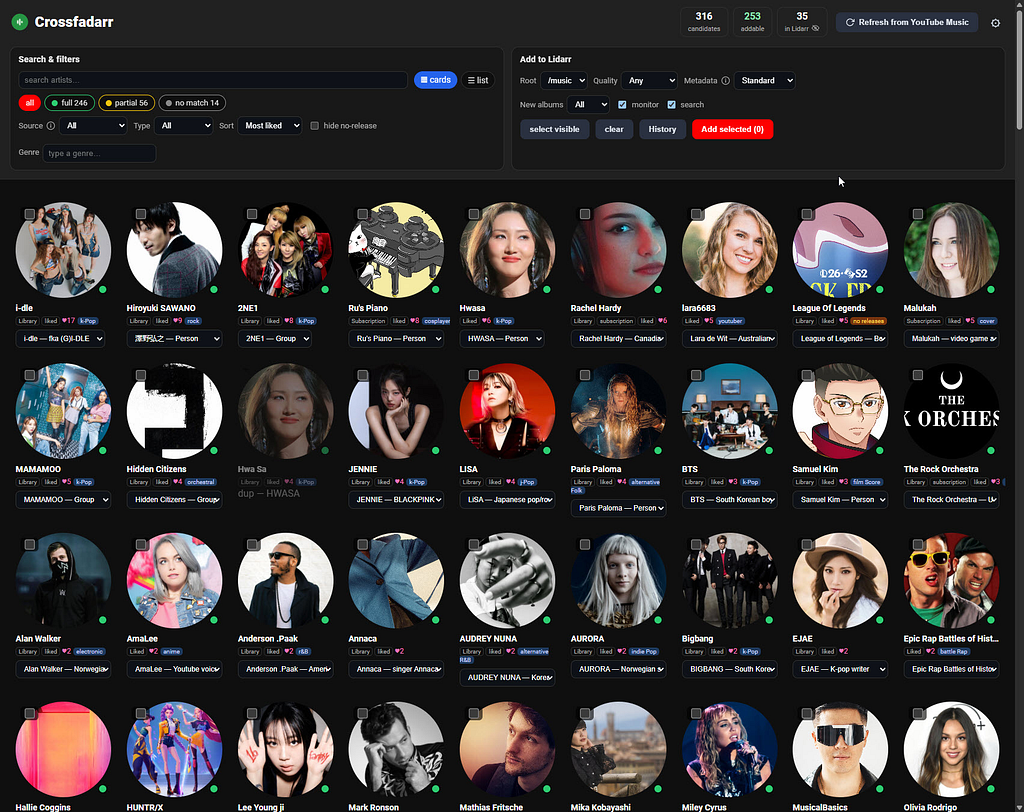
This is where a music library like mine gets spicy. A big chunk of what I listen to is Korean and Japanese, and those artists show up under native-script names, romanised names, stage names, and aliases — often all at once. A naïve string match drops half of them on the floor. Getting this right meant Unicode normalisation and matching a search against an artist’s primary name plus every alias MusicBrainz knows, so that 澤野弘之 and “Hiroyuki Sawano” resolve to the same person. Each match comes back tagged with a confidence tier — a green/amber/grey dot in the UI — and an alternates dropdown so I can fix the occasional wrong guess by hand instead of trusting the machine blindly.
There was an unexpected bonus here. I added a flag for artists that MusicBrainz lists no releases for — normally a sign you’d be adding an empty shell to Lidarr. It turned out to also be a great bad-match detector: a couple of famous artists were quietly matching to obscure bootleg or placeholder entries, and the “no releases” badge is what surfaced them. A feature I built to prevent one problem caught a different one for free.
Hard problem #3: making it feel finished
The bones were done in a day. The second day was almost entirely the difference between “a script that works” and “a thing a stranger could run”:
- Artwork. Circular artist portraits, because a wall of grey initials is depressing. It fetches from TheAudioDB where it can and falls back to the thumbnails YouTube Music already provides, so the review grid is fully illustrated either way.
- One-click scan. The whole pipeline — ingest, match, artwork, genres — runs inside the app behind a single “⟳ Refresh from YouTube Music” button with a live progress bar, instead of five scripts you run in order. (It’s slow once, thanks to MusicBrainz’s polite ~1-request-per-second rate limit, then cached and fast forever after.)
- Review, always. Search, filters by confidence/source/type/genre, card and list views — and crucially, nothing is sent to Lidarr until you tick artists and click Add selected. It dedupes against what’s already in your library and keeps a history of every add.
- Actually shippable. MIT licence, an optional arr-style login for the paranoid, a multi-arch Docker image published to GHCR, and a README that tells the truth about the fragile auth instead of hiding it.
The line I deliberately didn’t cross
Here’s the part I care about most. Crossfadarr downloads nothing. It talks to no torrent indexers, touches no piracy infrastructure, and circumvents no copy protection. It reads metadata from an account you own and writes metadata to software you run. What Lidarr does after an artist is added is Lidarr’s business, configured by you, in Lidarr.
That’s not a legal disclaimer I bolted on at the end — it’s a design constraint I held from the first commit, and it’s the line that keeps a project like this squarely in “managing my own library” territory rather than anywhere near the piracy conversation. The bridge only ever carries names, not music.
Where it landed
Crossfadarr is public: github.com/crossfadarr/crossfadarr, MIT-licensed, with a docker compose up and a ready-made image. Point it at your Lidarr, paste your YouTube Music headers (from an incognito window — you’ve read this far, you know why), hit scan, review the grid, add what you want.
The subscription I cancelled saved me a few dollars a month. The two days I spent making my own listening data portable saved me something I value more: another corner of my digital life that answers to me instead of to a login screen. That’s the whole homelab hobby in miniature, really — not saving money, exactly, but slowly taking the keys back.
One fewer subscription. One more thing I own.
Crossfadarr is an independent project, not affiliated with or endorsed by Google, YouTube, Lidarr, MusicBrainz, or TheAudioDB — those names are used only to describe what it connects to. It accesses your own account’s data through an unofficial API, which may conflict with YouTube’s Terms of Service; it’s for personal use, provided as-is. It manages metadata only and downloads nothing.
Built in a two-day sprint with substantial AI assistance (Anthropic’s Claude); every commit carries co-author attribution. Source, warts and honest auth story included, at github.com/crossfadarr/crossfadarr.